











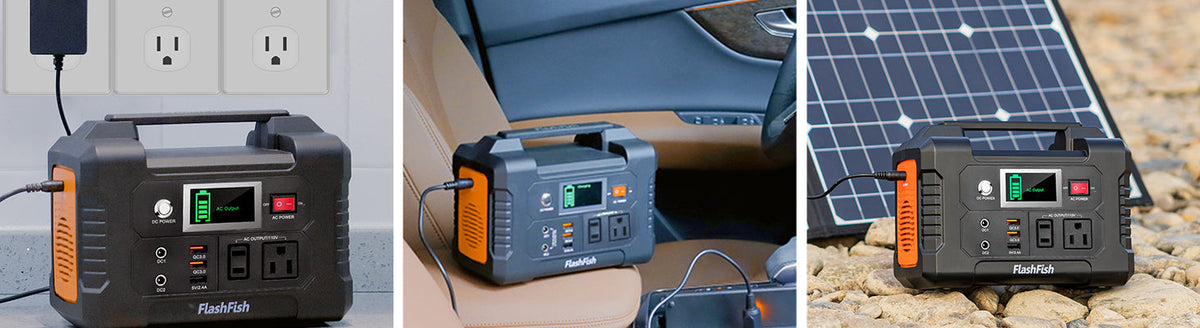
A practical reunion photo-sharing station starts with one designated tablet, a phone for collecting photos, and an optional small light. Choose power only after checking each device's charging requirements, deciding which devices need to charge together, and confirming the venue's placement rules. FlashFish A101 and E200 offer different USB arrangements; neither model's battery capacity alone establishes device compatibility or all-day operation.
The table's job is to help relatives see and share pictures without turning into an unlimited charging station. A clear purpose makes the equipment list easier to manage: show a slideshow, collect a few new pictures, and keep the organizer's communication device ready.
Decide what the table must do
Pick one person to manage the tablet and connections. Prepare the slideshow before the reunion and decide whether new pictures will be transferred locally or through an internet connection. Battery power does not establish Wi-Fi or cellular service, so photo transfer needs its own plan.
Separate the display device from guest charging requests. A relative plugging in another phone changes the port count and the charging schedule. Keep a waiting list or a scheduled charging turn instead of expanding the setup without checking it.
Make a device-and-cable worksheet
| Item | Information to record | Decision it supports |
|---|---|---|
| Slideshow tablet | Exact model, charging connector, supported charging voltage and protocol, intended display time | Whether a documented USB connection fits, or the original AC adapter needs separate checking |
| Organizer's phone | Charging requirements, cable type, priority compared with the tablet | Which port and charging turn to reserve |
| Optional small light | Input label, connector, power requirement, when it is needed | Whether to include it or use a separately powered light |
A USB-C connector describes the connection shape; it does not by itself establish the charging power a device will receive. Read the tablet's charging documentation and the cable specifications alongside the station's port ratings. If a label is missing, leave that item unresolved instead of assigning it a guessed wattage.
Where A101 and E200 fit
The FlashFish A101 manual lists 97.68Wh of battery capacity, two USB-C outputs rated up to 18W each, and two USB-A outputs rated up to 18W each. That makes its documented USB-C arrangement worth comparing for a tablet-and-phone table. These individual port ratings do not prove the power available when every port is used together.
The E200 manual lists 151Wh of battery capacity, two USB-A outputs rated up to 18W each, and one USB-A output rated up to 12W. It provides more nominal stored energy than A101, but its listed USB outputs do not include USB-C. A device requiring a particular USB-C charging mode needs a different connection analysis; changing the cable end does not establish that mode.
If an original wall adapter is necessary, pause the USB comparison and check the AC requirements separately. The available A101 manual describes a 230V version with regional socket variation. E200's manual distinguishes 110V and 230V versions and lists modified-sine AC. Confirm the exact U.S. unit and the adapter's voltage, frequency, waveform, and power requirements before choosing an AC setup.
Three ways to simplify the table
- One shared slideshow tablet: use a preloaded album and compare its documented USB requirements with the proposed port. This removes live photo transfer from the power decision.
- A tablet plus the organizer's phone: reserve separate documented ports when the exact requirements fit, or schedule charging turns. Do not assume that the sum of individual port ceilings is a combined-output rating.
- An evening photo table: add the light to the worksheet before selecting power. If its requirements remain unknown, keep it independently powered and leave the station plan focused on the tablet and phone.
Plan the physical layout before arrival
Ask the venue where the station may be placed, what cable routing it permits, and how the table should be managed if conditions change. Sketch the station, tablet stand, phone position, and approved cable route. Follow the exact equipment manuals for placement, ventilation, and operating conditions; an outdoor or covered venue does not establish a weather rating for the equipment.
Keep a fallback album ready on the tablet and agree on which device gets priority if the charging plan has to change. A supervised rehearsal with the exact equipment can identify missing cables or charging modes. It is preparation for your event, not a published runtime guarantee.
Frequently asked questions
Is the E200 automatically better because it has more watt-hours?
No. It has more nominal stored energy in the documented records, but the needed charging ports and protocols may favor a different arrangement.
Can I promise guests phone charging throughout the reunion?
Only make commitments based on your actual device list and a documented plan. This comparison does not establish charging counts or runtime.
Does a covered table make outdoor use suitable?
Cover alone does not answer the equipment's environmental requirements. Check the exact manuals and the venue's instructions.
What should I do before selecting a station?
Finish the tablet, phone, and light worksheet, resolve the U.S. model and connection requirements, then compare the current model details. Select only a setup whose documentation answers those questions.
Next step: Compare FlashFish A101 specifications with your equipment list.


Hinterlasse einen Kommentar
Diese Website ist durch hCaptcha geschützt und es gelten die allgemeinen Geschäftsbedingungen und Datenschutzbestimmungen von hCaptcha.