











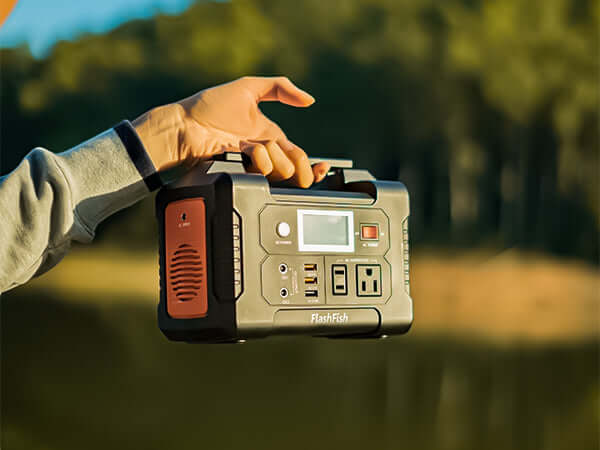
A portable power station can support a community garden workday when the plan stays focused on low-draw check-in, communication, and task-light needs. Before bringing one, list the phones, tablet, and light you expect to use; check their labels and connection requirements; protect equipment from weather; and follow the garden’s site rules.
Quick answer
For a garden workday, plan around essential communication and check-in tasks rather than trying to power every tool. Confirm each device’s label and cable, compare it with the station’s documented limits, choose a dry and stable location, and ask the site organizer about its rules before setting up.
Start with the workday’s real needs
A volunteer table often needs only a few basics: a phone for coordination, a tablet for sign-in, and a light if the site and conditions call for one. Make those the first entries on the list. Leave out equipment that has no clear task, no documented power path, or no appropriate place in the garden.
- Identify the devices needed for check-in and volunteer communication.
- Record the exact charger, power supply, cable, or adapter for each device.
- Set aside a reserve instead of planning to use every available connection.
Check labels and connections before the event
Device names are not enough for a power decision. Read the label on each charger or power supply and confirm the connection path in the manufacturer’s instructions. Inspect cables and adapters before packing. If an item’s requirement is unclear, keep it out of the event plan until it can be confirmed.
| Item | Pre-workday check |
|---|---|
| Phone | Confirm the charger, cable, and documented connection method. |
| Tablet | Check the power supply label and the tasks it must support. |
| Task light | Confirm its label and place it where it will not create a trip hazard. |
| Station | Review its documented capacity and continuous-output limit against the planned items. |
Compare FlashFish models by documented facts
The FlashFish E200 is documented with 151Wh of capacity and a 200W continuous AC output. The FlashFish E103 is documented with 179.2Wh of capacity, a 300W continuous pure-sine AC output, and LiFePO4 battery chemistry. Use those facts to begin a label-by-label comparison; they do not guarantee runtime, device compatibility, or suitability for garden equipment.
Respect the garden and the weather
Confirm site rules with the garden organizer before bringing electrical equipment. Place the station on a dry, stable surface away from watering areas, foot traffic, and loose soil. Route cables so volunteers can see and avoid them. If rain, moisture, unstable placement, or a site-rule question creates uncertainty, pause the setup and follow the relevant instructions.
Workday checklist
- Ask the garden organizer about site rules and the best check-in location.
- List the essential phones, tablet, and light.
- Verify every label, cable, and adapter before the event.
- Choose a dry, stable surface outside walking and watering areas.
- Keep the plan limited to documented, low-draw support tasks.
Related workday power planning
Use these current FlashFish pages and guides to continue your comparison:
- Browse current portable power stations
- Check cordless-tool charger labels before a workday
- Review watt-hours before estimating session length
FAQ
Can we use a portable power station for every garden tool?
No. This checklist is for low-draw check-in, communication, and task-light planning. Any tool needs its own label and manufacturer-instruction review.
Where should the station sit during the workday?
Choose a dry, stable surface away from watering, foot traffic, and loose or easily snagged cables.
Do community-garden rules matter for a small setup?
Yes. Check with the site organizer before bringing or placing electrical equipment.

Deixar comentário
Este site é protegido por hCaptcha e a Política de privacidade e os Termos de serviço do hCaptcha se aplicam.