











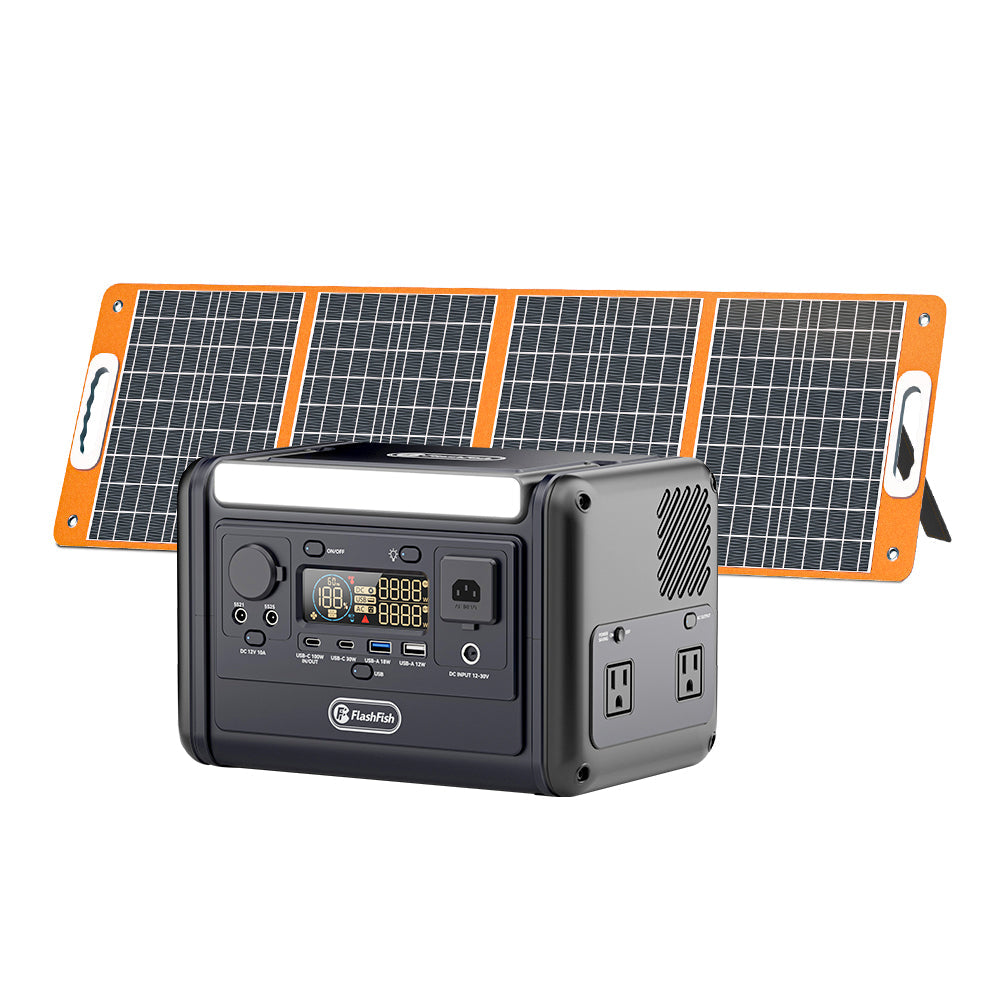
Short answer: Before storing a FlashFish T300Pro between trips, inspect the case, vents, ports, display, and power accessories; then follow the exact model documentation for charging state, storage conditions, and any service instruction. Stop using the station and seek support guidance if you find damage, abnormal heat, moisture, odor, swelling, or an instruction you cannot verify.
Begin with the exact product documentation
The T300Pro request resolves to the FlashFish TELLUS-T300Pro record. That manual-derived record identifies a 230Wh LiFePO4 station with 300W continuous pure-sine AC output, two 120V AC outlets, and a 4.5kg listed weight. It also lists a storage-temperature range of -20°C to 40°C. Verify these details against the original manual for the exact unit before relying on them, especially if the product label, market version, or included accessories differ.
Pre-storage inspection checklist
- Turn the station off and disconnect every cable and accessory.
- Inspect the case, handle, outlets, USB ports, DC ports, and vents for visible damage, debris, moisture, or anything unusual.
- Check the display and controls only as described in the model documentation; do not try to diagnose an unclear indicator by trial and error.
- Inspect the supplied or documented charging equipment for damage before storing it with the station.
- Review the manual’s instructions for the required charging state and storage location.
- Store the unit in the conditions specified for the exact model, away from conditions the documentation does not permit.
Do not turn a visual check into a repair
An inspection is a decision point, not a repair procedure. Do not open the enclosure, modify ports, substitute an unverified adapter, or continue charging when the unit or its accessories show a concern. The bundled record lists protection functions, but that is not a reason to bypass the original manual or use damaged equipment. For questions that the manual does not answer, contact the appropriate product-support channel with the exact model and a clear description of what you observed.
Review the ports and accessories by label
The TELLUS-T300Pro record lists USB-C1 up to 100W, USB-C2 up to 30W, USB-A1 up to 18W, USB-A2 up to 12W, plus DC outputs that share a 120W maximum. These are station-side specifications only. They do not confirm the suitability of a particular device, cable, charger, or adapter. Keep accessories paired with their own labels and verify them against the manual before the next trip.
Set up a storage note for the next trip
| Record | Why it helps | What to avoid |
|---|---|---|
| Exact model and serial information | Helps identify the right documentation and support path. | Assuming another T300Pro listing has the same configuration. |
| Inspection date | Creates a clear handoff before the next trip. | Calling an older observation a current condition. |
| Accessory list | Separates verified gear from unmarked extras. | Mixing unknown adapters with the station’s equipment. |
| Question or concern | Makes follow-up specific. | Continuing use while a material concern is unresolved. |
When to pause and get help
Pause storage preparation and seek guidance when you find visible damage, water exposure, an unusual smell, deformation, a loose connector, unexpected heat, or a discrepancy between the unit and its documentation. This is intentionally a conservative boundary: the local product record does not replace the original manual or a qualified support assessment.
FAQ
What charge level should I leave in a T300Pro for storage?
Use the exact model manual. The local product bundle does not provide a storage charge-level instruction for this model.
Can I store the station in a garage or vehicle?
Check the original manual and the actual conditions. The record lists a storage-temperature range, but it does not establish that every garage or vehicle environment is appropriate.
Should I use a different USB-C charger if the original one is missing?
Do not assume an unverified replacement is suitable. Confirm the charging requirements in the exact documentation before using another charger.
Finish the checklist by keeping the manual, the labeled accessories, and a note of unresolved questions together. That makes the next pre-trip review faster without turning a storage check into an unsupported repair or performance claim.
Next step: View the current FlashFish T300Pro product details.


Leave a comment
Situs ini dilindungi oleh hCaptcha dan berlaku Kebijakan Privasi serta Ketentuan Layanan hCaptcha.