












Short answer: size a campground check-in power setup from the labels on the tablet, phone, card reader, and light. Add each device's wattage over the hours it will run, confirm the required USB or AC connections, and choose a station with enough continuous output and usable energy for that plan. Keep the station dry, stable, shaded, and away from guest traffic.
A busy check-in table does not usually fail because someone forgot the largest battery. It fails because a cable is missing, a device expects a different charging standard, the table is exposed to rain, or every outlet gets assigned without a written load list. A small planning sheet prevents most of those problems.
Start with the equipment, not the power station
Place every device and its original charger on the table before the event. Record the input printed on each charger or device. For an AC adapter, note its rated input and output. For USB equipment, note the connector and the charging standard required by the manufacturer. A USB-C connector alone does not prove that two devices support the same voltage or protocol.
| Item to record | Why it matters | Where to verify it |
|---|---|---|
| Watts or volts and amps | Defines the device's power requirement | Device label, original adapter, or manual |
| Connector and charging standard | Determines whether the planned output and cable match | Manufacturer documentation |
| Hours of actual use | Converts power into an energy estimate | Event schedule and staff plan |
| Essential or optional | Protects check-in capacity when energy is limited | Coordinator's operating plan |
Calculate a transparent energy budget
For each device, multiply watts by expected operating hours to estimate watt-hours. Add the results. This is a planning estimate, not a runtime promise: conversion losses, idle draw, temperature, battery condition, brightness, network activity, and cycling loads can all change the result. Leave a deliberate reserve instead of planning to consume the station's entire labeled capacity.
These three examples show the arithmetic only. Replace every number with the labels and schedule for your equipment.
- A 12W tablet used for six hours produces a 72Wh planning load.
- The same tablet plus a 10W phone charged for two hours produces a 92Wh planning load.
- Adding a 5W task light for four hours raises that illustrative total to 112Wh.
Check peak simultaneous power separately. In the third example, all three devices operating together would represent 27W based on the assumed labels. Energy capacity and continuous output are different checks; passing one does not guarantee passing the other.
Match outputs before comparing capacity
A power station may have enough watt-hours but still be a poor fit if it lacks the required output. Make a port map showing exactly where the tablet, phone, card reader, hotspot, and light will connect. Do not plan around adapters that have not been approved by the device maker, and do not assume an unused connector is interchangeable with the one in the manual.
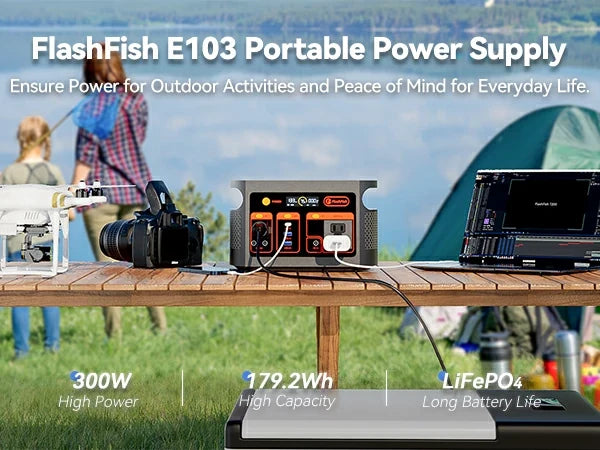
For a compact reference point, the FlashFish E200 is documented in the product database with 151Wh capacity and 200W continuous AC output. The FlashFish E103 is documented with 179.2Wh capacity, 300W continuous pure-sine AC output, and USB-C output up to 60W. Those specifications narrow the shortlist; they do not certify either station for a particular tablet, payment terminal, hotspot, or combined setup. Verify each device and the current U.S. product version.
Design the table for people and weather
Put the station on a firm surface where staff can see it but guests cannot kick it or pull a cable. Keep ventilation openings clear. Use cable paths that do not cross a walking route. Follow the campground's rules for electrical equipment, tents, extension cords, and charging. Portable power equipment should not be exposed to rain or standing water; if weather protection would obstruct ventilation or safe operation, stop using the setup.
Use a two-layer operating plan
Layer one is the minimum check-in system: the primary tablet, its network path, and one communication device. Layer two contains conveniences such as a second tablet, decorative lighting, or guest charging. Staff should know which layer to disconnect first if the energy estimate proves optimistic.
- Charge every device and the station before arrival.
- Test the exact cables, adapters, and simultaneous device mix.
- Label each cable and assigned output.
- Record the station display at scheduled intervals.
- Keep a paper guest list or another non-powered fallback.
FAQ
How many watt-hours does a campground check-in tablet need?
There is no universal figure. Multiply the tablet's verified wattage by expected use time, then account separately for its charger, screen settings, network use, and other devices. Keep a reserve rather than treating labeled station capacity as fully available runtime.
Is a portable power station better than a power bank for check-in?
It depends on the output paths. A compatible power bank may be enough for one USB-powered tablet. A station becomes more relevant when the verified setup needs AC power, several output types, or a larger energy budget.
Can guests charge their phones from the same station?
Only if guest charging is part of the documented load plan and staff can manage the cables safely. Treat it as optional and disconnect it before essential check-in equipment.
What is the most important backup?
A tested non-powered check-in method. A paper list or another approved offline process prevents a cable, network, or charging problem from stopping guest entry.
Next step: Compare FlashFish E200 specifications with your equipment list.

Leave a comment
เว็บไซต์นี้ได้รับการคุ้มครองโดย hCaptcha และมีการนำนโยบายความเป็นส่วนตัวของ hCaptcha และข้อกำหนดในการใช้บริการมาใช้